Shopify Markets installatie
Shopify Markets is een functionaliteit van Shopify sinds 2025 om meerdere Shopify shops op één backend te beheren. Alleen kan je niet binnen in de Shopify App verschillende gegevens invullen per domein. Ook is er een probleem met de webhooks bij Shopify Markets. Onderstaand staat uitgelegd welke onderdelen uitgevoerd moeten worden die verschillen van de standaard implementatie service.
🎯 Stap 1: Cookie Keeper Script toevoegen (HEAD - VOOR GTM code)
Navigeer naar: Online Store → Themes → Actions → Edit code → theme.liquid
Voeg het volgende script toe in de <head> sectie, VOOR de Google Tag Manager code
<script type="text/javascript">
(function() {
    'use strict';

    // Generate UUID v4 (compatible method)
    function mkTagging_generateUUID() {
        // Fallback for older browsers without crypto API
        if (typeof crypto !== 'undefined' && crypto.getRandomValues) {
            return ([1e7]+-1e3+-4e3+-8e3+-1e11).replace(/[018]/g, function(c) {
                return (c ^ crypto.getRandomValues(new Uint8Array(1))[0] & 15 >> c / 4).toString(16);
            });
        } else {
            // Less secure fallback for very old browsers
            return 'xxxxxxxx-xxxx-4xxx-yxxx-xxxxxxxxxxxx'.replace(/[xy]/g, function(c) {
                var r = Math.random() * 16 | 0;
                var v = c === 'x' ? r : (r & 0x3 | 0x8);
                return v.toString(16);
            });
        }
    }

    // Get cookie value by name
    function mkTagging_getCookie(name) {
        var nameEQ = name + "=";
        var ca = document.cookie.split(';');
        for (var i = 0; i < ca.length; i++) {
            var c = ca[i];
            while (c.charAt(0) === ' ') c = c.substring(1, c.length);
            if (c.indexOf(nameEQ) === 0) return c.substring(nameEQ.length, c.length);
        }
        return null;
    }

    // Set cookie with expiration
    function mkTagging_setCookie(name, value, days) {
        var expires = "";
        if (days) {
            var date = new Date();
            date.setTime(date.getTime() + (days * 24 * 60 * 60 * 1000));
            expires = "; expires=" + date.toUTCString();
        }
        // Set both path and SameSite for better compatibility
        document.cookie = name + "=" + value + expires + "; path=/; SameSite=Lax";
    }

    // Safe localStorage wrapper
    function mkTagging_getLocalStorage(key) {
        try {
            if (typeof Storage !== 'undefined' && window.localStorage) {
                return localStorage.getItem(key);
            }
        } catch (e) {
            // localStorage might be blocked or unavailable
            console.log('localStorage not available:', e);
        }
        return null;
    }

    function mkTagging_setLocalStorage(key, value) {
        try {
            if (typeof Storage !== 'undefined' && window.localStorage) {
                localStorage.setItem(key, value);
                return true;
            }
        } catch (e) {
            // localStorage might be blocked or unavailable
            console.log('localStorage not available:', e);
        }
        return false;
    }

    // Main initialization function
    function mkTagging_initVisitorId() {
        var cookieName = '_taggingmk';
        var storageKey = '_taggingmk_backup';
        var visitorId = null;

        // 1. Check if cookie exists
        visitorId = mkTagging_getCookie(cookieName);

        // 2. If no cookie, check localStorage backup
        if (!visitorId) {
            visitorId = mkTagging_getLocalStorage(storageKey);

            // If found in localStorage but not in cookie, restore the cookie
            if (visitorId) {
                mkTagging_setCookie(cookieName, visitorId, 365);
                console.log('MK Tagging: Visitor ID restored from localStorage:', visitorId);
            }
        }

        // 3. If still no ID, generate a new one
        if (!visitorId) {
            visitorId = mkTagging_generateUUID();
            mkTagging_setCookie(cookieName, visitorId, 365);
            console.log('MK Tagging: New visitor ID generated:', visitorId);
        }

        // 4. Always sync to localStorage as backup (if available)
        if (mkTagging_setLocalStorage(storageKey, visitorId)) {
            console.log('MK Tagging: Visitor ID backed up to localStorage');
        }

        // Return the visitor ID for potential use
        return visitorId;
    }

    // Run on DOM ready or immediately if already loaded
    if (document.readyState === 'loading') {
        document.addEventListener('DOMContentLoaded', mkTagging_initVisitorId);
    } else {
        // DOM is already loaded
        mkTagging_initVisitorId();
    }

    // Create a namespaced object for any exposed functionality
    window.mkTagging = window.mkTagging || {};
    window.mkTagging.getVisitorId = function() {
        return mkTagging_getCookie('_taggingmk') || mkTagging_getLocalStorage('_taggingmk_backup');
    };

})();
</script>
🎯 Stap 2: GTM Head Code toevoegen
Voeg direct NA het Cookie Keeper script de volgende GTM code toe (nog steeds in de <head> sectie):
! Vervang de [TAALCODE], [SERVER DOMEINNAAM], [LOADER ID] en [GTM-ID] in onderstaand script !
Bij meer dan 3 domeinen in de Shopify Markets (of minder dan 3) pas je het aantal keer
"{%- when '[TAALCODE]' ..."
natuurlijk aan.
{%- case request.locale.iso_code -%}
  {%- when '[TAALCODE]' -%}
    {%- assign gtm_id = '[GTM-ID]' -%}
    {%- assign tagging_url = '[SERVER DOMEINNAAM]' -%}
    {%- assign loader_id = '[LOADER ID]' -%}
  {%- when '[TAALCODE]' -%}
    {%- assign gtm_id = '[GTM-ID]' -%}
    {%- assign tagging_url = '[SERVER DOMEINNAAM]' -%}
    {%- assign loader_id = '[LOADER ID]' -%}
  {%- when '[TAALCODE]' -%}
    {%- assign gtm_id = '[GTM-ID]' -%}
    {%- assign tagging_url = '[SERVER DOMEINNAAM]' -%}
    {%- assign loader_id = '[LOADER ID]' -%}
{%- endcase -%}

<script>
  window.trytagging_new_version = {% if loader_id != blank %}true{% else %}false{% endif %};
  window.dataLayerName = "dataLayer";
  window[window.dataLayerName] = window[window.dataLayerName] || [];
  window.trytagging_disable_order_notes = true;
</script>

<script>
  (function () {
    function t(t, e, r) {
      if ("cookie" === t) {
        var n = document.cookie.split(";");
        for (var o = 0; o < n.length; o++) {
          var i = n[o].split("=");
          if (i[0].trim() === e) return i[1];
        }
      } else if ("localStorage" === t) return localStorage.getItem(e);
      else if ("jsVariable" === t) return window[e];
      else console.warn("invalid uid source", t);
    }
    function e(e, r, n) {
      var o = document.createElement("script");
      (o.async = !0), (o.src = r), e.insertBefore(o, n);
    }
    function r(r, n, o, i, a) {
      var c,
        s = !1;
      try {
        var u = navigator.userAgent,
          f = /Version\/([0-9\._]+)(.*Mobile)?.*Safari.*/.exec(u);
        f && parseFloat(f[1]) >= 16.4 && ((c = t(o, i, "")), (s = !0));
      } catch (t) {
        console.error(t);
      }
      var l = (window[a] = window[a] || []);
      l.push({ "gtm.start": new Date().getTime(), event: "gtm.js" });

      var dl = a != "dataLayer" ? "&l=" + a : "";

      var g =
          r +
          "{% if loader_id != blank %}/{{ loader_id }}.js?sp={{ gtm_id | remove: 'GTM-' }}{% else %}/script.js?id={{ gtm_id | remove: 'GTM-' }}{% endif %}" +
          (s ? "&enableCK=true" : "") +
          (c ? "&mcookie=" + encodeURIComponent(c) : "") +
          dl,
        d = document.getElementsByTagName("script")[0];
      e(d.parentNode, g, d);
    }
    r(
      "{{ tagging_url }}",
      "{{ gtm_id | remove: 'GTM-' }}",
      "undefined",
      "undefined",
      window.dataLayerName
    );
  })();

const dataLayerName = window.dataLayerName ?? "dataLayer";
let hasSentConsent = false;

if (window[dataLayerName]) {
  const originalDataLayerPush = window[dataLayerName].push;

  window[dataLayerName].push = (...args) => {
    originalDataLayerPush.apply(window[dataLayerName], args);

    try {
      if (args[0][0] === "consent" && args[0][1] === "update") {
        const consentArgs = {
          analytics: args[0][2].analytics_storage === "granted",
          marketing:
            args[0][2].ad_storage === "granted" &&
            args[0][2].ad_personalization === "granted" &&
            args[0][2].ad_user_data === "granted",
          preferences: args[0][2].personalization_storage === "granted",
          sale_of_data: args[0][2].ad_user_data === "granted",
        };

        // Wait for the consent to be set
        if (!hasSentConsent) {
          window.Shopify.loadFeatures(
            [
              {
                name: "consent-tracking-api",
                version: "0.1",
              },
            ],
            function (error) {
              if (error) console.error("Error loading consent-tracking-api", error);
              window.Shopify.customerPrivacy.setTrackingConsent(
                consentArgs,
                () => {}
              );
            }
          );
          hasSentConsent = true;
        }
      }
    } catch (error) {
      console.error("Error setting tracking consent", error);
    }
  };
}
</script>
🎯 Stap 3: Body sectie aanpassen
In hetzelfde theme.liquid bestand, vervang de huidige GTM code direct na de opening <body> tag door onderstaande code:
! Vervang de [TAALCODE], [SERVER DOMEINNAAM] en [GTM-ID] in onderstaand script !
Bij meer dan 3 domeinen in de Shopify Markets (of minder dan 3) pas je het aantal keer
"{%- when '[TAALCODE]' ..."
natuurlijk aan.
{%- case request.locale.iso_code -%}
  {%- when '[TAALCODE]' -%}
    {%- assign gtm_id = '[GTM-ID]' -%}
    {%- assign tagging_url = '[SERVER DOMEINNAAM]' -%}
  {%- when '[TAALCODE]' -%}
    {%- assign gtm_id = '[GTM-ID]' -%}
    {%- assign tagging_url = '[SERVER DOMEINNAAM]' -%}
  {%- when '[TAALCODE]' -%}
    {%- assign gtm_id = '[GTM-ID]' -%}
    {%- assign tagging_url = '[SERVER DOMEINNAAM]' -%}
{%- endcase -%}

<!-- Google Tag Manager (noscript) -->
<noscript><iframe src="{{ tagging_url }}/ns.html?id={{ gtm_id }}" height="0" width="0" style="display:none;visibility:hidden"></iframe></noscript>
<!-- End Google Tag Manager -->

<script>
  (function() {
    const script = document.createElement("script");
    script.type = "text/javascript";
    script.defer = true;
    script.src = "{{ tagging_url }}/shopify-datalayer-minified.js";

    script.onerror = () => {
      console.error("Tagging Data Layer: JS script failed to load");
    };

    script.onload = async () => {
      window.taggingHelpers.updateShopSettings(({{- page_title | json -}}), {{- cart.currency.iso_code | json -}});
      await window.taggingHelpers.initFetching();
      window.taggingHelpers.userDataWithCart({{- cart | json -}});

      {%- if collection and template.name == "collection" -%}
      const listId = {{- collection.id | json -}};
      const listName = {{- collection.title | json -}};
      const items = [
        {%- assign itemIndex = 1 -%}
        {%- for product in collection.products -%}
        {%- for variant in product.variants limit:1 -%} {
          item_id : {{- variant.id | json -}},
          item_name: {{- product.title | json -}},
          item_brand: {{- product.vendor | json -}},
          item_category: {{- product.type | json -}},
          item_variant: {{- variant.title | json -}},
          item_sku: {{- variant.sku | json -}},
          price: "{{- product.price | times: 0.01 | json -}}",
          position: {{- itemIndex -}},
          item_variant_id: {{- variant.id | json -}},
          item_product_id: {{- product.id | json -}},
          item_image: {{- product.featured_image | json -}},
          handle: {{- product.handle | json -}}
        },
        {%- endfor -%}
        {%- assign itemIndex = itemIndex | plus: 1 -%}
        {%- endfor -%}];
      window.taggingHelpers.viewItemList(listId, listName, items);
      window.taggingHelpers.bindListItems(listId, listName, items);
      {%- endif -%}

      {%- if product -%}
      const item = {
        {% assign default_variant = product.selected_or_first_available_variant %}
        {%- if default_variant != blank -%}
        defaultVariant : {
          item_id : {{- default_variant.id | json -}},
          item_name: {{- product.title | json -}},
          item_brand: {{- product.vendor | json -}},
          item_category: {{- product.type | json -}},
          item_variant: {{- default_variant.title | json -}},
          item_sku: {{- default_variant.sku | json -}},
          price: "{{- default_variant.price | times: 0.01 | json -}}",
          item_product_id: {{- product.id | json -}},
          item_variant_id: {{- default_variant.id | json -}},
          compareAtPrice: "{{- default_variant.compare_at_price | times: 0.01 | json -}}",
          item_image: {{- product.featured_image | json -}},
          currency: {{- cart.currency.iso_code | json -}},
        },
        {%- else -%}
        defaultVariant : null,
        {%- endif -%}
        items: [
          {%- for variant in product.variants -%} {
            item_id : {{- variant.id | json -}},
            item_name: {{- product.title | json -}},
            item_brand: {{- product.vendor | json -}},
            item_category: {{- product.type | json -}},
            item_variant: {{- variant.title | json -}},
            item_sku: {{- variant.sku | json -}},
            price: "{{- variant.price | times: 0.01 | json -}}",
            item_product_id: {{- product.id | json -}},
            item_variant_id: {{- variant.id | json -}},
            compareAtPrice: "{{- variant.compare_at_price | times: 0.01 | json -}}",
            item_image: {{- product.featured_image | json -}}
          },
          {%- endfor -%}],
      };
      const value = item.defaultVariant?.price ?? item.items[0].price;
      window.taggingHelpers.viewItem(item, value);
      {%- endif -%}

      {%- if request.page_type == "cart" -%}
      window.taggingHelpers.handleViewCart();
      {%- endif -%}

      window.taggingHelpers.init();
    }

    document.body.appendChild(script);
  })();
</script>
🎯 Stap 4: Customer Events pixel toevoegen
Navigeer naar: Settings → Customer Events → Add custom pixel
Maak een nieuwe custom pixel aan met de volgende code:
! Vervang de [SERVER DOMEINNAAM], [DOMEINNAAM], [GTM-ID zonder GTM-] en [GTM-ID] in onderstaand script !
Bij meer dan 3 domeinen in de Shopify Markets (of minder dan 3) pas je het aantal keer
"if(page_location.includes( ..."
natuurlijk aan.
const apShopifyConfig = {
  version: "1.0.0",
  cookieKeeperType: "cookie",
  cookieKeeperStorageName: "_taggingmk",
  domain: "[SERVER DOMEINNAAM]",
  pixelId: "[GTM-ID]",
};
const page_location = init?.context?.document?.location?.href ?? "";
const load_pixel =
  page_location.includes("checkout") || page_location.length === 0;

function getShopConfig() {
  if (page_location.includes("[DOMEINNAAM]")) {
    return {
      ...apShopifyConfig,
      truncatedPixelId: "[GTM-ID zonder GTM-]",
      domain: "[SERVER DOMEINNAAM]",
    };
  }

  if (page_location.includes("[DOMEINNAAM]")) {
    return {
      ...apShopifyConfig,
      truncatedPixelId: "[GTM-ID zonder GTM-]",
      domain: "[SERVER DOMEINNAAM]",
    };
  }

  if (page_location.includes("[DOMEINNAAM]")) {
    return {
      ...apShopifyConfig,
      truncatedPixelId: "[GTM-ID zonder GTM-]",
      domain: "[SERVER DOMEINNAAM]",
    };
  }

  return apShopifyConfig;
}

if (load_pixel) {
  (function () {
    function t(t, e, r) {
      if ("cookie" === t) {
        var n = document.cookie.split(";");
        for (var o = 0; o < n.length; o++) {
          var i = n[o].split("=");
          if (i[0].trim() === e) return i[1];
        }
      } else if ("localStorage" === t) return localStorage.getItem(e);
      else if ("jsVariable" === t) return window[e];
      else console.warn("invalid uid source", t);
    }
    function e(e, r, n) {
      var o = document.createElement("script");
      (o.async = !0), (o.src = r), e.insertBefore(o, n);
    }
    function r(r, n, o, i, a) {
      var c,
        s = !1;
      try {
        var u = navigator.userAgent,
          f = /Version\/([0-9\._]+)(.*Mobile)?.*Safari.*/.exec(u);
        f && parseFloat(f[1]) >= 16.4 && ((c = t(o, i, "")), (s = !0));
      } catch (t) {
        console.error(t);
      }
      var l = (window[a] = window[a] || []);
      l.push({ "gtm.start": new Date().getTime(), event: "gtm.js" });
      var g =
          r +
          "/Q1dUWlEmZW52.js?tg=" +
          n +
          (s ? "&enableCK=true" : "") +
          (c ? "&mcookie=" + encodeURIComponent(c) : ""),
        d = document.getElementsByTagName("script")[0];
      e(d.parentNode, g, d);
    }
    r(
      `https://${getShopConfig().domain}`,
      getShopConfig().truncatedPixelId,
      "cookie",
      "_taggingmk",
      "dataLayer"
    );
  })();
}

const execute = async (api) => {
  if (load_pixel) {
    console.log(`Loading pixel for ${getShopConfig().domain}`);
    const scriptUrl = `https://${getShopConfig().domain}/pixel-minified.js`;
    try {
      if (scriptUrl) {
        const module = await import(scriptUrl);
        module.default(api, getShopConfig());
      }
    } catch (e) {
      console.error(e);
    }
  }
};

execute({ analytics, browser, init });
🎯 Stap 5: AdPage app uitschakelen
BELANGRIJK: Voer deze stap pas uit nadat je hebt gecontroleerd dat alle tracking correct werkt met de nieuwe implementatie.
Navigeer naar: Apps → AdPage
Klik op Uninstall app of Disable app
Bevestig de deïnstallatie
Deze app is niet meer nodig omdat de tracking nu volledig via de server-side implementatie verloopt. Was er geen app aanwezig? Dan kan je stap 5 overslaan.
✅ Verificatie na implementatie
Controleer na implementatie het volgende:
Browser console: Check op eventuele JavaScript errors
Cookie check: Verifieer dat de
_taggingmkcookie correct wordt aangemaaktNetwork tab: Verificeer dat calls naar de juiste tagging subdomeinen gaan
Stap 6: Webhooks
Je kan maar geen handmatige webhooks aanmaken in de backend van Shopify voor de verschillende domeinen. Dus je maakt in Shopify maar één webhook voor /order_created aan.
In de server container en in Google Tag Manager ontvang je dus alleen maar webhooks vanaf één domein. Terwijl de aankopen wel vanaf verschillende domeinen op de frontends gemaakt zijn.
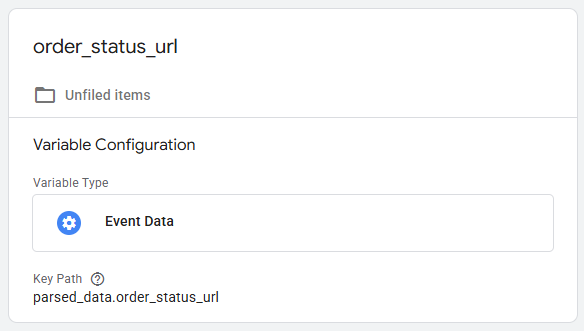
In Google Tag Manager moet je je RegEx Table variabele niet instellen op de 'marketing.hostname' zoals je gewend bent bij een standaard Shopify shop. Maar je stelt de RegEx Table variabele in op de 'parsed_data.order_status_url'.